
Prepare Your Software for UAE E-Invoicing
Learn how to prepare your ERP, accounting, POS or existing business software for UAE e-Invoicing — from reviewing invoice data and mandatory fields to ASP integration, validation and end-to-end testing.
Is Your Existing Software Ready for UAE E-Invoicing?
Your business may not need to replace its existing ERP, accounting, POS or business software. The first step is to determine whether the system already captures the invoice information required for structured e-Invoicing and whether it can connect with the required integration process.
Review Existing Invoice Data
Check the seller, buyer, invoice, tax, item, payment and transaction information currently captured by your software.
Identify Missing Information
Compare your existing data with the information needed for UAE e-Invoicing and identify fields or business rules that need to be added.
Prepare for Integration
Determine how your software can prepare structured invoice data and connect with the selected Accredited Service Provider for the required e-Invoicing workflow.
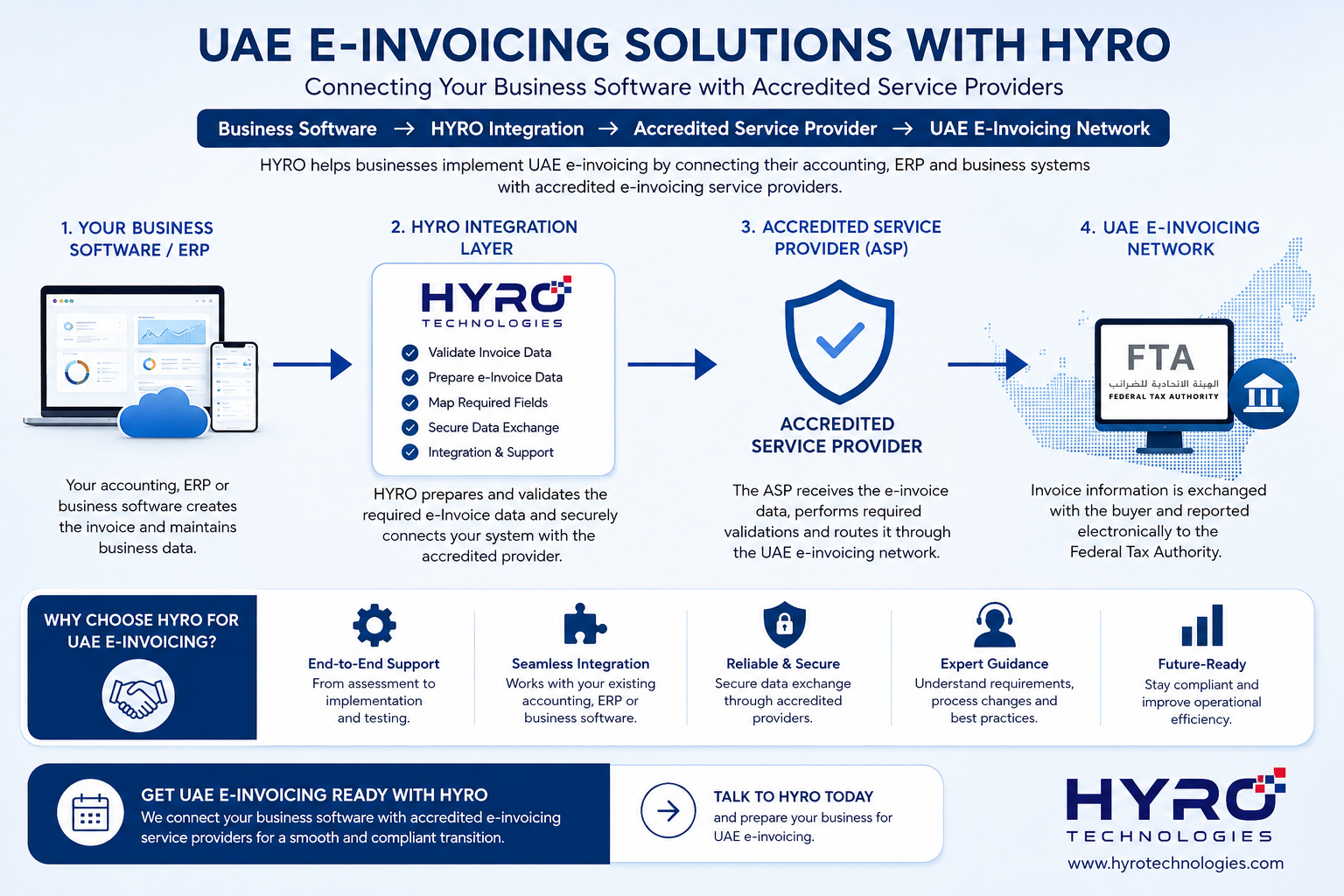
How Your Existing Software Connects to UAE E-Invoicing
Your ERP, accounting, POS or business software remains responsible for creating the business transaction. The required invoice data can then be prepared, validated and passed through the integration flow to the selected Accredited Service Provider.
What Information Should Your Software Be Ready to Capture?
Preparing for UAE e-Invoicing starts with the quality and completeness of the information stored in your existing business software.
Businesses should review their current invoice workflow and make sure the required seller, buyer, tax, invoice and line-item information can be captured accurately and consistently.
The exact data requirements should be mapped against the applicable UAE e-Invoicing specifications during implementation.
✓ Seller and business information
✓ Buyer / customer information
✓ Invoice number and invoice date
✓ Tax and VAT information
✓ Product or service line details
✓ Quantity, price, discount and totals
✓ Payment and transaction information
✓ References required for applicable invoice types
What Changes Might Your Existing ERP or Accounting Software Need?
After reviewing the existing invoice data, the next step is to identify practical changes required in the software. The exact changes will depend on the current system, available data and the applicable UAE e-Invoicing requirements.
Add Missing Invoice Fields
Add any required seller, buyer, tax, reference, invoice or line-item information that the existing application does not currently capture.
Improve Data Validation
Validate important information before an invoice is prepared for electronic exchange, helping reduce incomplete or incorrectly formatted data.
Prepare Structured Invoice Data
Map information from the existing database into the structured format required by the applicable e-Invoicing integration.
Build ASP Connectivity
Create the required integration between the business application and the selected Accredited Service Provider using the supported technical connection method.
Track Invoice Status
Where required, allow the business application to record processing results and relevant invoice status information returned through the integration.
Handle Corrections & Related Documents
Review how applicable credit notes, corrections, references and other supported document flows should be handled by the existing software.
Can Different Types of Business Software Be Prepared for UAE E-Invoicing?
Yes. The preparation approach can be adapted to different business applications. The important part is understanding where invoice data is stored, identifying any missing information and determining a practical integration method for the existing system.
ERP Systems
Review customer, sales, tax, item and accounting data and map the required invoice information for the e-Invoicing integration.
Accounting Software
Prepare sales invoice, customer, VAT, payment and related accounting information required for the applicable electronic invoice flow.
POS & Retail Software
Review applicable invoicing transactions and determine how required invoice information can be prepared from the existing POS database.
Restaurant & Cafe Software
Assess applicable business invoice flows and prepare the required transaction and customer information for integration.
Spa, Salon & Gym Software
Review applicable invoices generated from memberships, services, packages and other business transactions and prepare the required information where e-Invoicing applies.
Custom & Legacy Software
Older or custom applications can be assessed based on their database structure, available APIs and other practical methods for extracting and exchanging invoice information.
UAE E-Invoicing Software Readiness Checklist
Before starting an e-Invoicing integration project, businesses can review the following areas in their existing ERP, accounting, POS or business software.
- Confirm that seller and company information is complete and maintained correctly.
- Review customer and buyer information captured by the existing system.
- Check VAT, tax and other applicable invoice information used by the software.
- Review invoice numbers, dates, document types and related document references.
- Check product and service descriptions, quantities, prices, discounts and totals.
- Identify mandatory information that is currently missing from the database or invoice workflow.
- Determine how existing invoice data can be mapped into the required structured format.
- Review whether the application has an API or another practical integration method.
- Plan connectivity with the selected Accredited Service Provider.
- Plan validation, testing and error-handling before production implementation.
When Should Businesses Prepare Their Software for UAE E-Invoicing?
Businesses should avoid waiting until their mandatory implementation date before reviewing their accounting, ERP, POS or other invoicing software.
Software preparation can involve reviewing existing invoice data, adding missing fields, mapping structured invoice information, selecting an Accredited Service Provider, developing the integration and completing end-to-end testing.
Starting early gives businesses more time to identify data or integration gaps and resolve them before mandatory implementation.
From 1 July 2026
Pilot Programme and voluntary implementation.
Revenue above AED 50 million
Appoint an ASP by 30 October 2026.
Mandatory implementation by 1 January 2027.
Revenue below AED 50 million
Appoint an ASP by 31 March 2027.
Mandatory implementation by 1 July 2027.
View Complete UAE E-Invoicing Deadlines →
Step-by-Step UAE E-Invoicing Software Preparation
A structured preparation process can help businesses identify software and data gaps early, prepare the required integration and complete testing before mandatory implementation.
Explore More UAE E-Invoicing Guides
Continue with our practical UAE e-Invoicing resources covering the complete framework, implementation deadlines, Accredited Service Providers and HYRO integration.
UAE E-Invoicing Software Preparation Questions
Common questions businesses may have when preparing their ERP, accounting, POS or existing business software for UAE e-Invoicing.
Do I need to replace my existing accounting or ERP software for UAE e-Invoicing?
Not necessarily. An existing system may be suitable if it can capture the required invoice information and can be appropriately prepared and integrated with the selected Accredited Service Provider. The current software should first be assessed for data completeness and integration capability.
Is a PDF invoice considered a UAE eInvoice?
No. UAE e-Invoicing is based on structured invoice data that can be electronically exchanged and processed. PDF files, Word documents, images, scanned invoices and emails are not themselves considered structured eInvoices.
What information should my software capture for UAE e-Invoicing?
Businesses should review seller, buyer, invoice, tax, line-item and other applicable information required by the UAE e-Invoicing specifications. The exact mandatory fields should be mapped against the latest official UAE requirements during implementation.
Can POS and retail software connect to UAE e-Invoicing?
Where an invoicing transaction falls within the applicable UAE e-Invoicing requirements, the existing POS or retail system can be assessed to determine whether the required invoice data can be captured, prepared and integrated through the appropriate e-Invoicing workflow.
Can custom or legacy software be integrated?
Potentially yes. The practical approach depends on the application's database structure, available APIs, invoice data and other integration capabilities. A technical assessment can determine the most suitable approach.
What is an Accredited Service Provider (ASP)?
An Accredited Service Provider is a service provider accredited to provide electronic invoicing services under the UAE e-Invoicing framework. Business software exchanges the required invoice information through the applicable ASP integration process.
Is HYRO an Accredited Service Provider?
HYRO provides business software preparation and integration services. Where an Accredited Service Provider is required, HYRO can work on preparing the business-software side and integrating it with an appropriate accredited provider.
When should we start preparing our software?
Businesses should begin preparation before their applicable mandatory implementation date. Reviewing invoice data, identifying missing fields, developing integrations and completing end-to-end testing can require time, particularly for existing or custom business systems.
Is Your Software Ready for UAE E-Invoicing?
Already using ERP, accounting, POS or custom business software? HYRO can help review your existing invoice workflow, identify missing information and prepare the software-side integration required to connect with an appropriate Accredited Service Provider.