HYRO Accounting Software

Control Your Business Finances More Clearly

Manage sales, purchases, expenses, customers, suppliers, receivables, payables, tax and financial reports from one easy-to-use system.

✓ Sales & Invoicing ✓ Purchase Management ✓ Expense Control ✓ Financial Reports
HYRO Accounting
HYRO Accounting Software Dashboard
Receivable & Payable Control Track customer receivables and supplier payables.
Financial Reports Review sales, purchases, expenses and business performance.
Built for Daily Business Accounting

Manage Your Accounts From One System

HYRO Accounting helps businesses manage daily financial transactions and understand important business information more clearly.

💰

Sales Management

Record sales and maintain customer invoice information in an organized system.
🛒

Purchase Management

Record supplier purchases and keep purchase information available for review.

🧾

Expense Management

Record and monitor daily business expenses for better cost visibility.

📥

Receivables

Monitor outstanding customer balances and receivable information more clearly.

📤

Payables

Track supplier outstanding balances and payment obligations.

📊

Reports

Review sales, purchases, expenses and other important financial reports.

Real HYRO Accounting Software

Understand Your Business More Clearly

Explore HYRO Accounting screens and see how sales, purchases, expenses, receivables, payables and financial information are managed from one system.

01 Accounting Dashboard

See Your Financial Position At a Glance

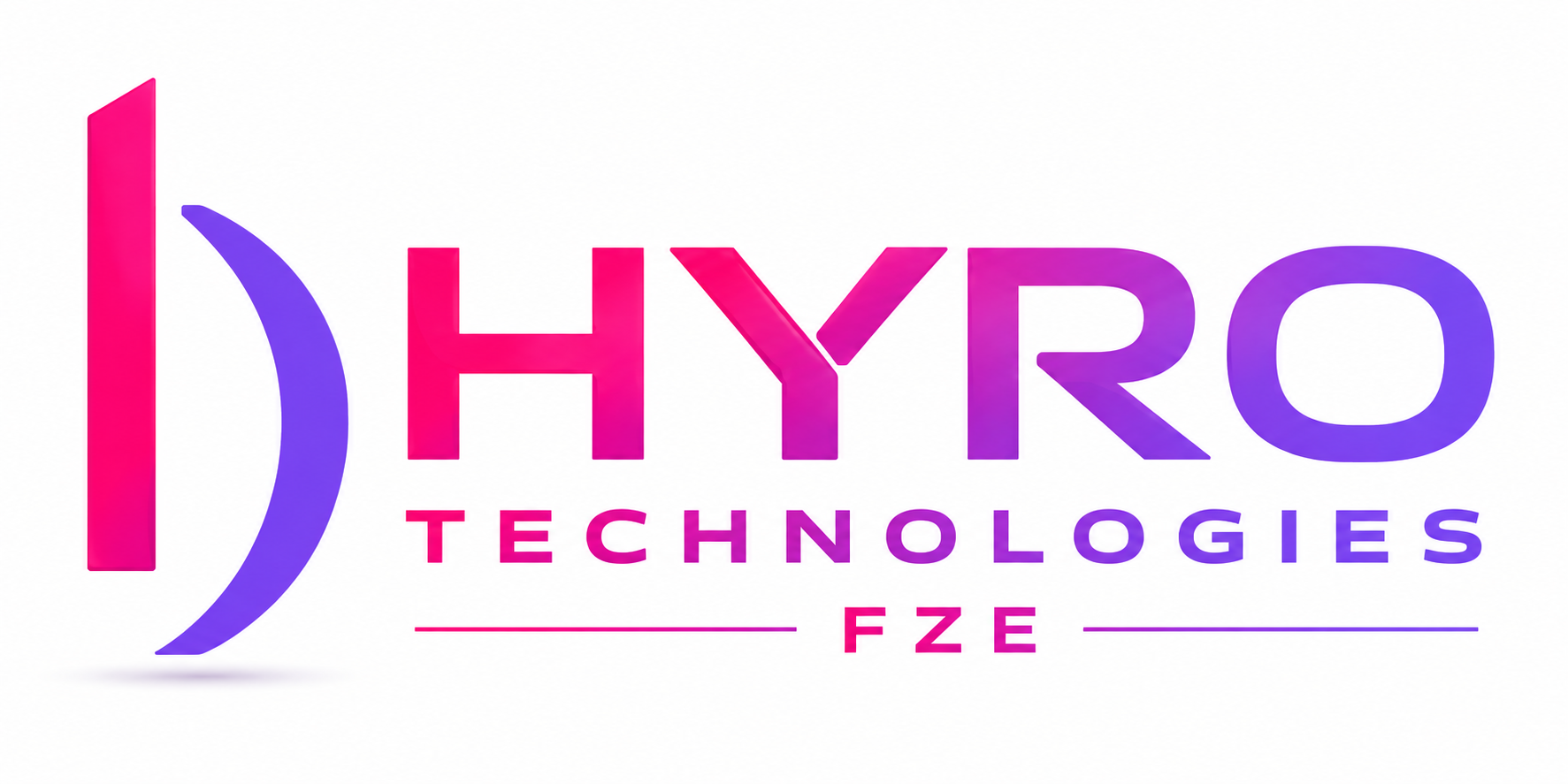
The HYRO Accounting dashboard brings important financial information together so management can quickly review sales, purchases, expenses and outstanding balances.
  • Sales summary
  • Purchase summary
  • Expense overview
  • Receivable outstanding
  • Payable outstanding
  • Sales and purchase payment analysis
  • PDC received and paid reminders
HYRO Accounting Dashboard
HYRO Accounting Software Dashboard
HYRO Accounting - Customer Management
HYRO Accounting Customer Management
02 Customer Management

Keep Your Customer Information Organized

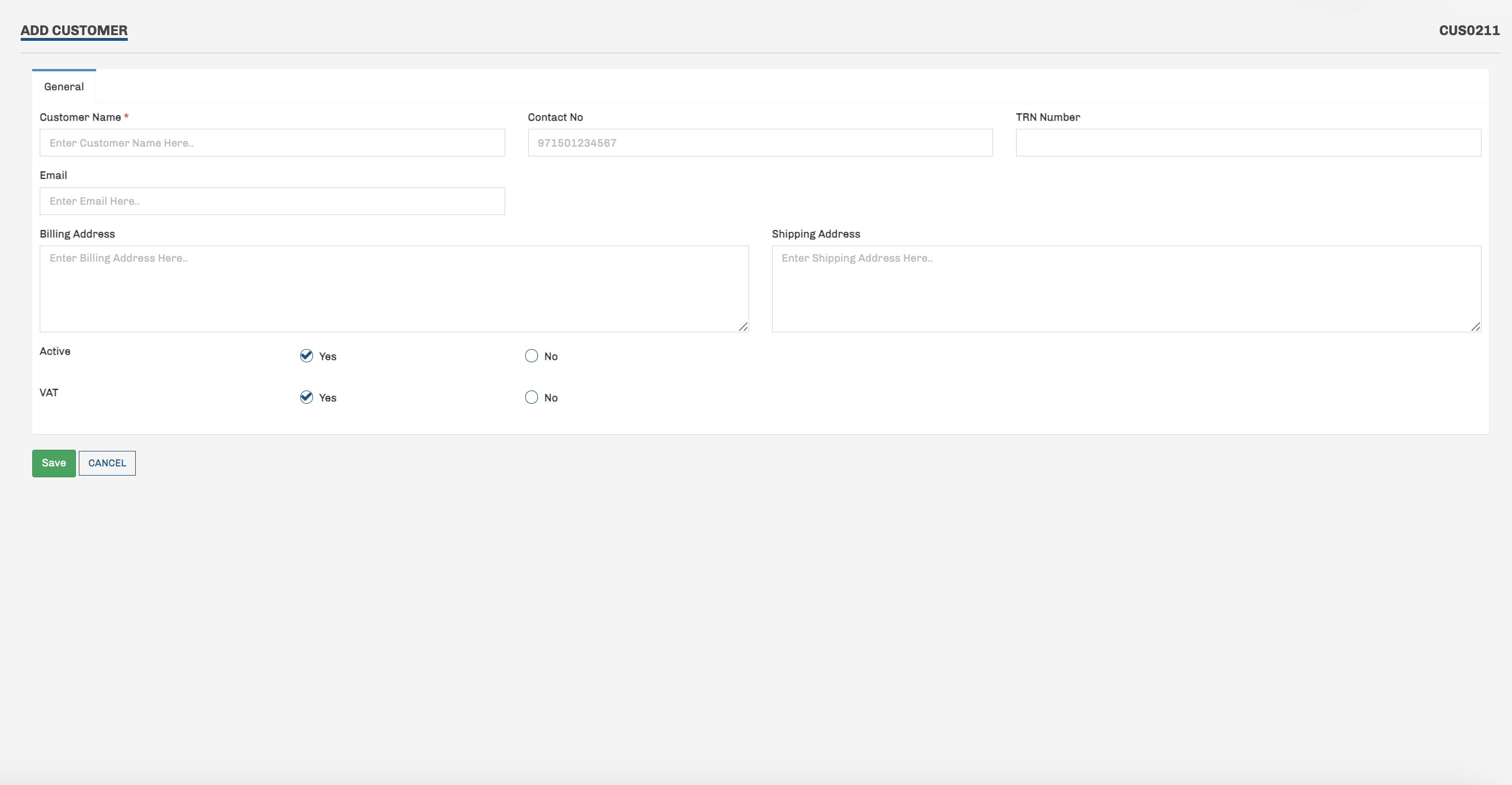
Maintain important customer information in one place and use it throughout your accounting and sales transactions.

  • Customer contact information
  • Email and contact number
  • Tax registration information
  • Billing address
  • Shipping address
  • Tax applicable customer control
  • Active / inactive customer control
03 Vendor / Supplier Management

Manage Your Suppliers From One Place

Keep supplier information organized and readily available for purchases, payments and day-to-day accounting operations.
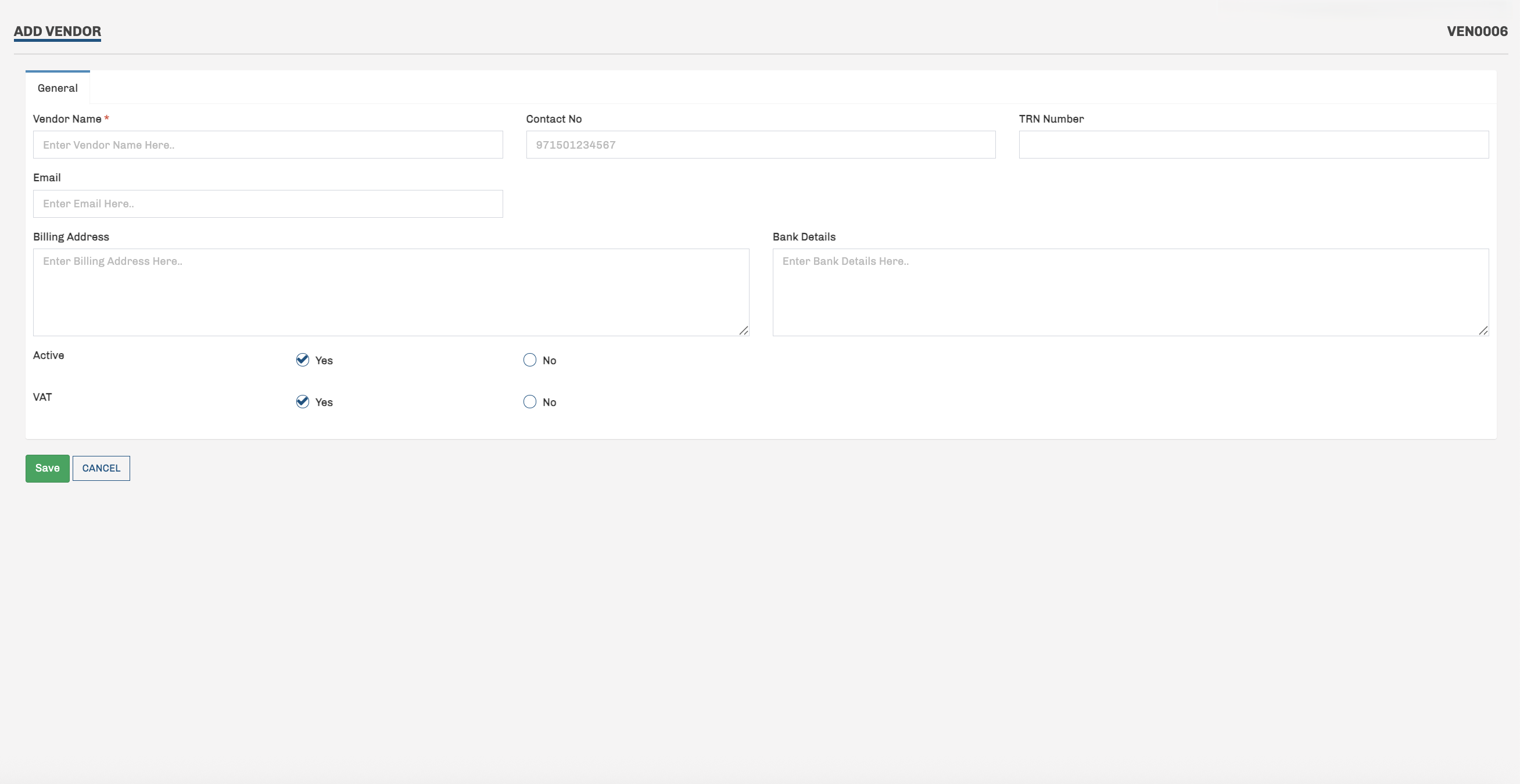
  • Vendor / supplier master
  • Contact information
  • Email details
  • Tax registration information
  • Billing address
  • Bank details
  • Tax applicable supplier control
  • Active / inactive supplier control
HYRO Accounting - Vendor Management
HYRO Accounting Vendor and Supplier Management
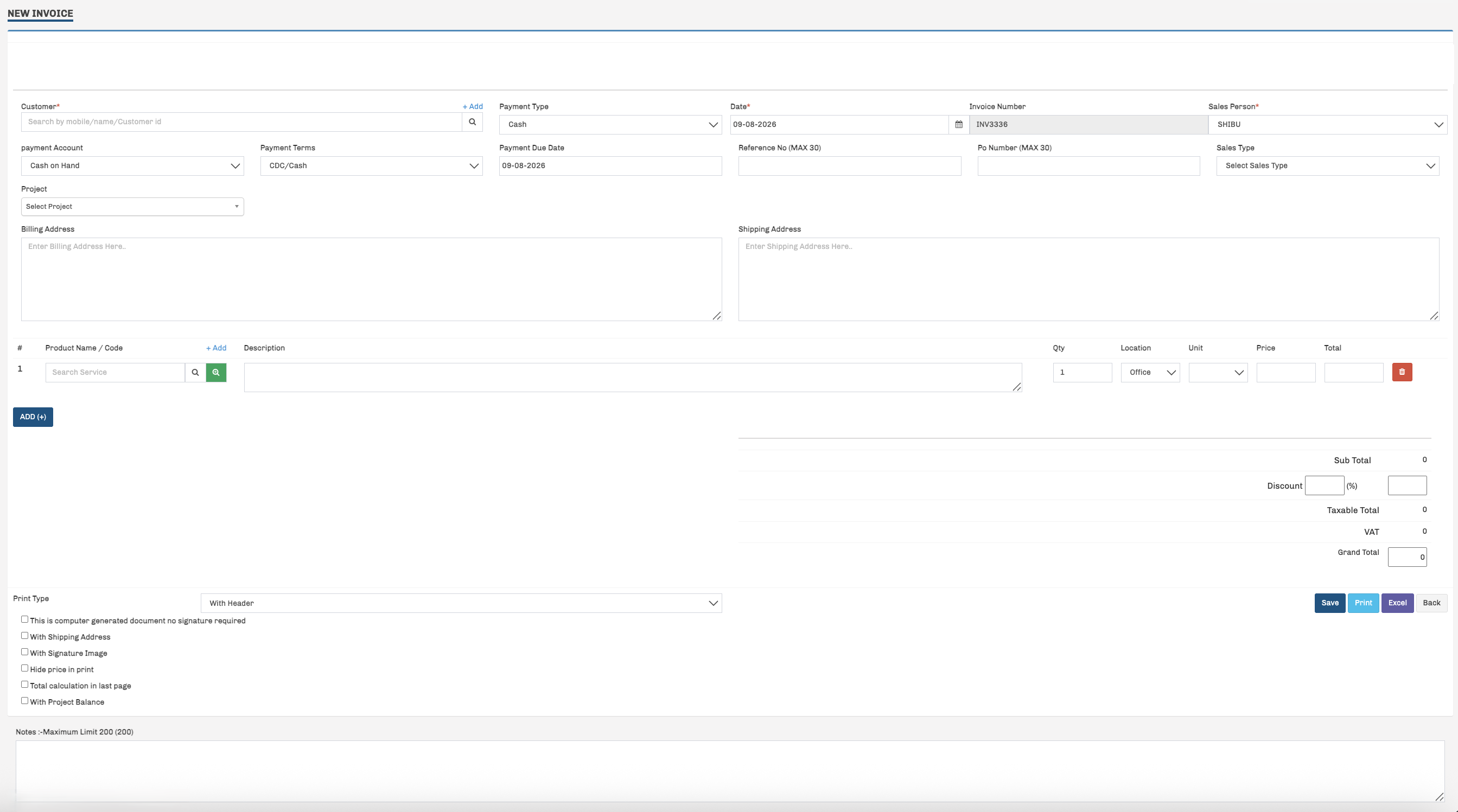
HYRO Accounting - Sales & Invoice
HYRO Accounting Sales and Invoice Management
04 Sales & Invoice Management

Create Sales Invoices Quickly & Accurately

Create professional sales invoices while managing customers, products, payment information, taxes and outstanding amounts from one screen.

  • Customer selection and quick customer creation
  • Automatic invoice numbering
  • Multiple payment types and payment accounts
  • Payment terms and due-date management
  • Reference and purchase order numbers
  • Billing and shipping addresses
  • Product / service line items
  • Quantity, unit price and discount calculations
  • Configurable tax calculations
  • Invoice printing and Excel export
05 Purchase Management

Manage Your Purchases With Better Control

HYRO Accounting helps you record supplier purchases, payment information, product details, taxes and outstanding amounts from one organized screen.
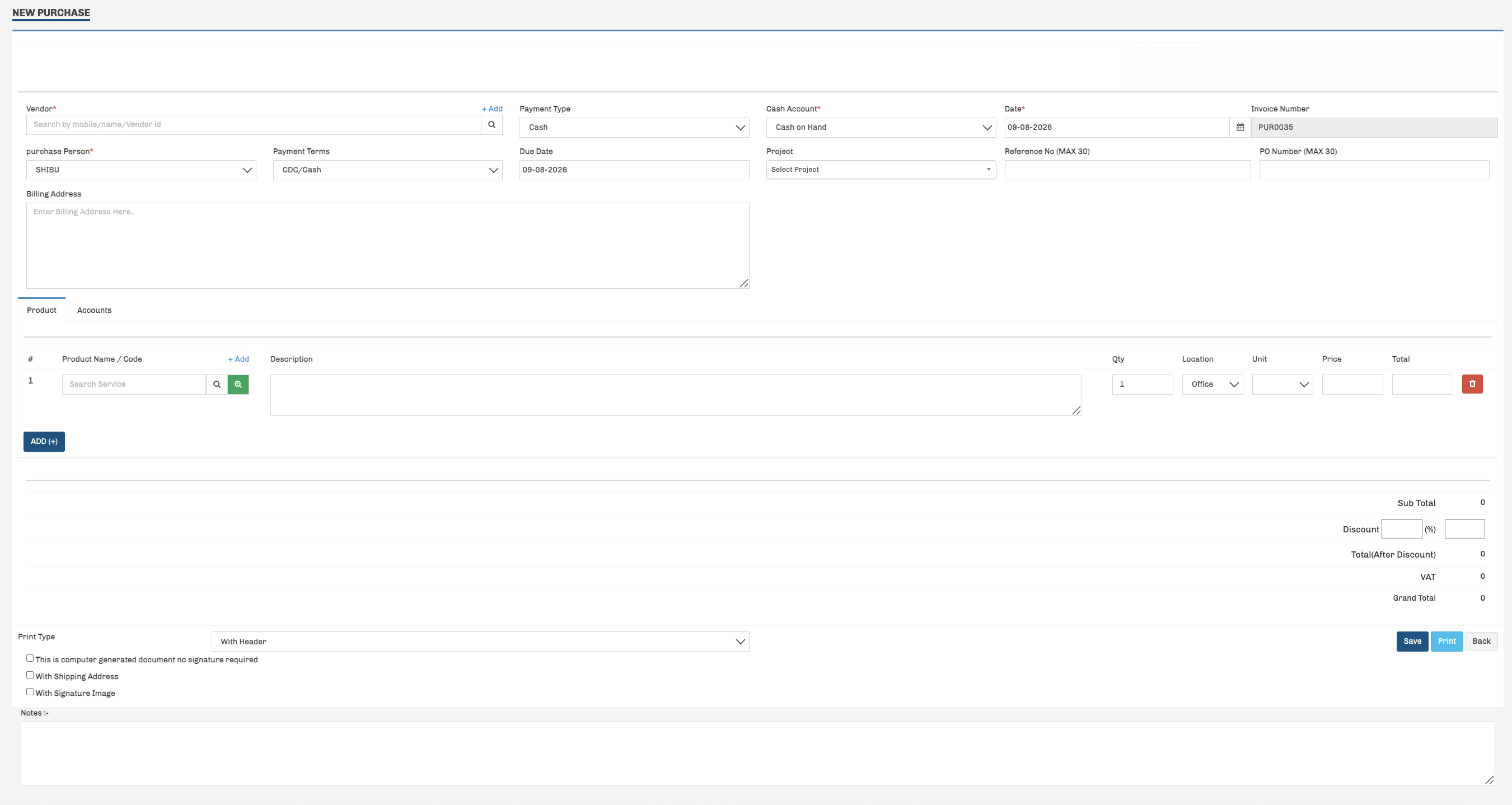
  • Vendor selection and quick vendor creation
  • Automatic purchase invoice numbering
  • Cash and credit purchase support
  • Payment account selection
  • Payment terms and due-date management
  • Supplier invoice and reference numbers
  • Product / service line items
  • Quantity, unit price and discount calculations
  • Configurable tax calculations
  • Purchase invoice printing
HYRO Accounting - Purchase Management
HYRO Accounting Purchase Management
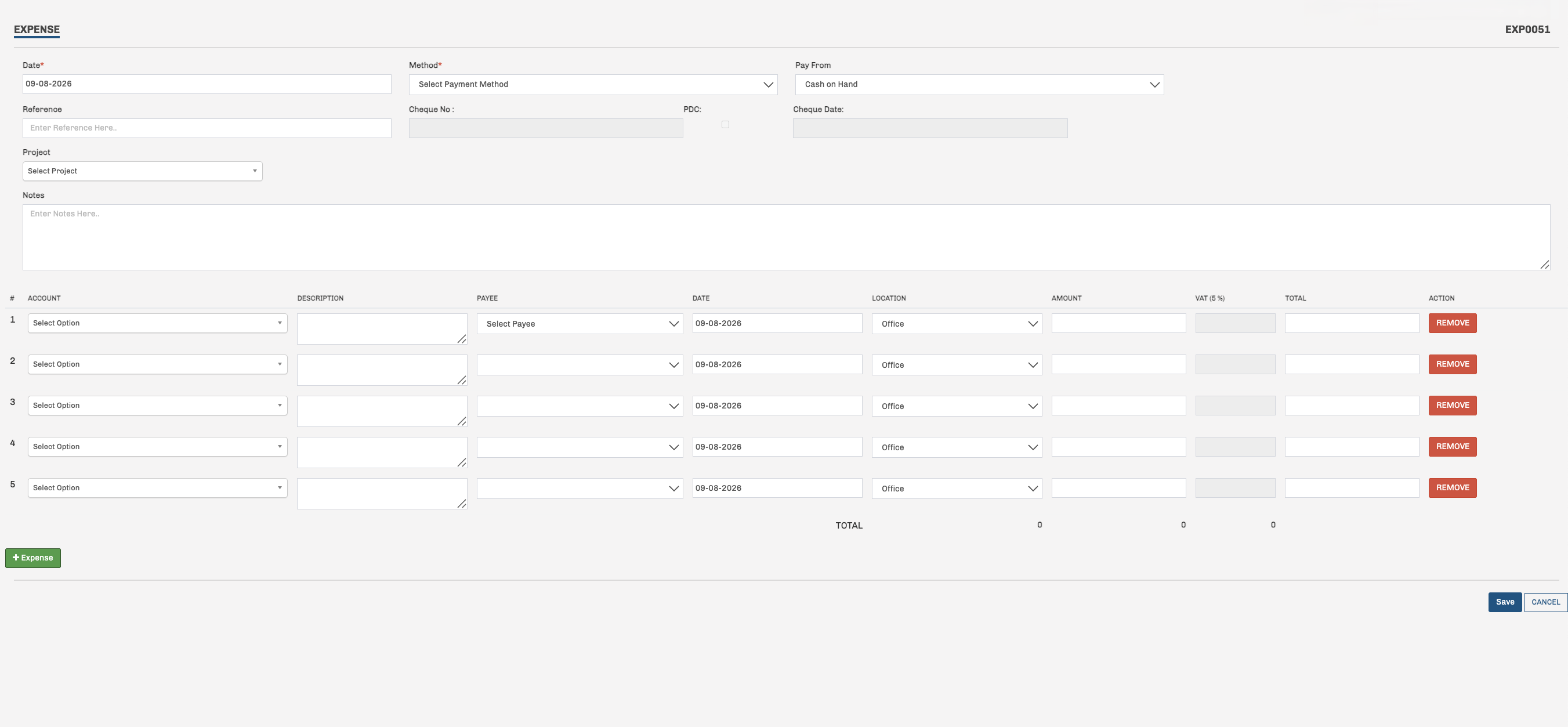
HYRO Accounting - Expense Management
HYRO Accounting Expense Management
06 Expense Management

Control Business Expenses From One Place

Record and manage daily business expenses with clear payment, account, payee, tax and project information from one organized screen.

  • Daily expense entry
  • Multiple payment methods
  • Cash and bank account selection
  • Cheque and PDC details
  • Project-wise expense tracking
  • Expense account selection
  • Payee-wise expense tracking
  • Multiple expense lines in one transaction
  • Location-wise expense recording
  • Configurable tax calculation
07 Customer Receipt Management

Receive Customer Payments and Allocate Them Clearly

HYRO Accounting helps you receive customer payments, allocate amounts against pending invoices and maintain clear receipt information from one organized screen.
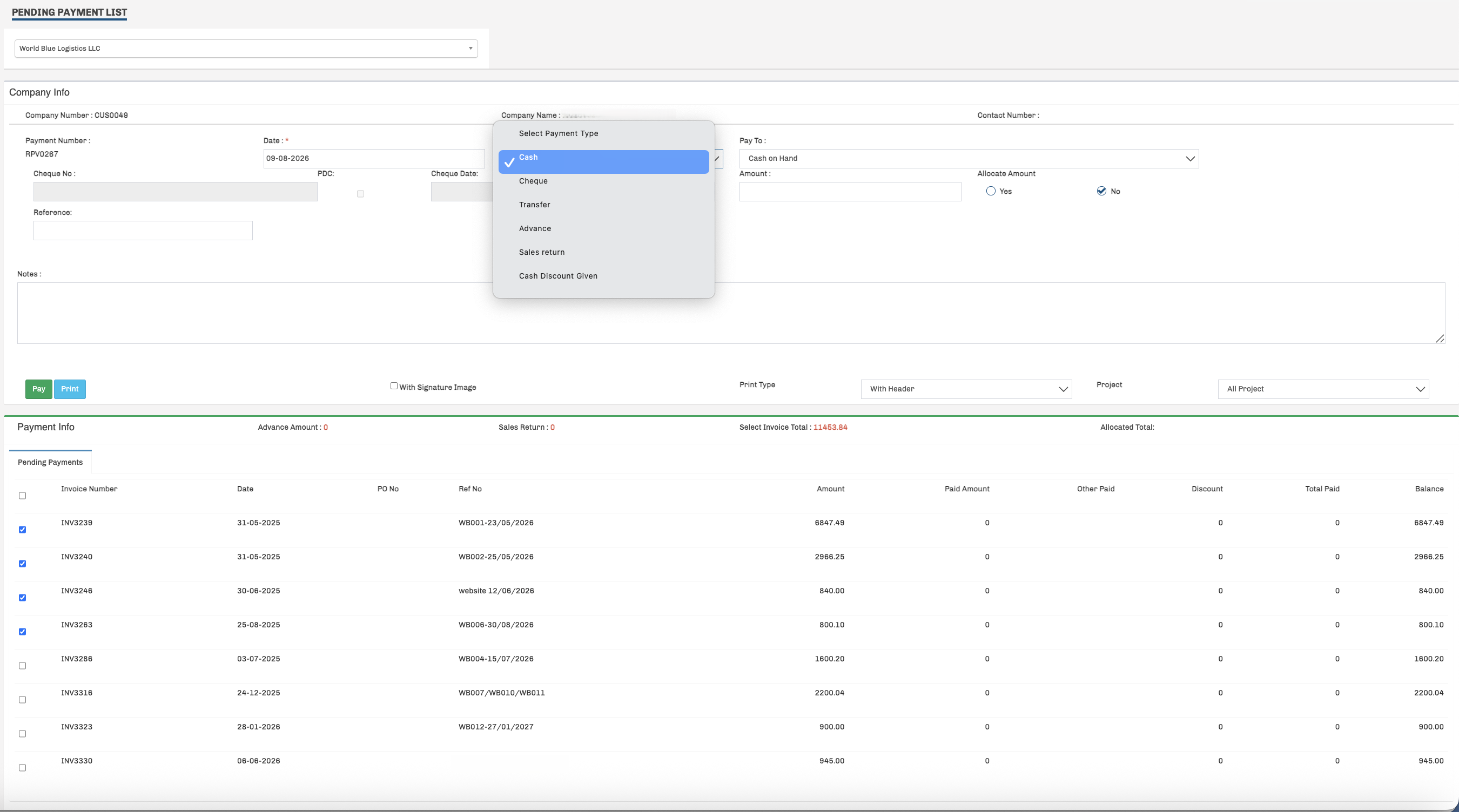
  • Customer-wise pending payment list
  • Receipt voucher / payment number
  • Cash, cheque and transfer payment methods
  • Advance receipt support
  • Sales return and cash discount options
  • Cash / bank account selection
  • Cheque and PDC information
  • Allocate payment against selected invoices
  • View invoice amount, paid amount and balance
  • Receipt printing options
HYRO Accounting - Customer Receipt
HYRO Accounting Customer Receipt and Receive Payment Management
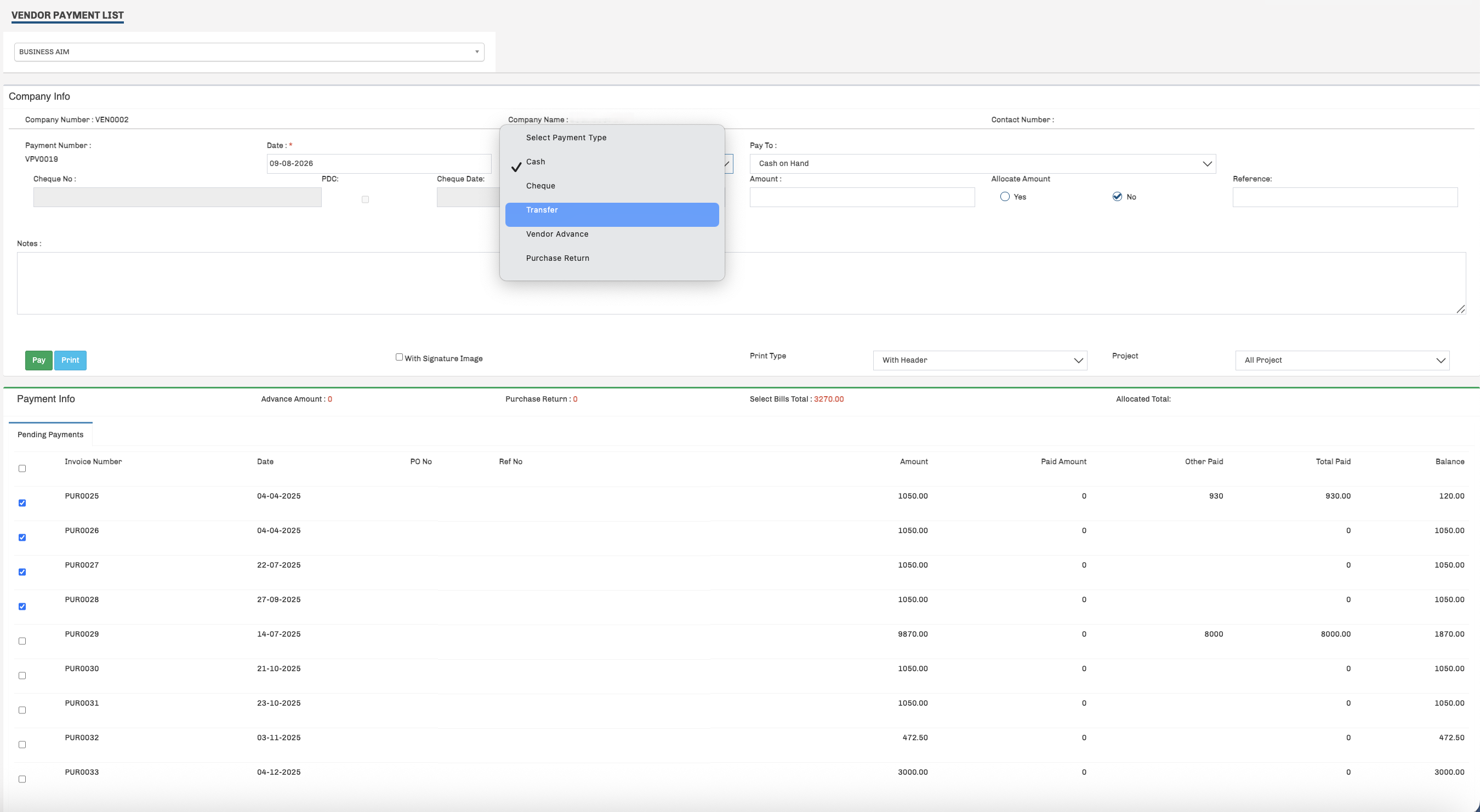
HYRO Accounting - Supplier Payment
HYRO Accounting Supplier Payment and Payment Voucher
08 Supplier Payment Management

Pay Suppliers and Manage Outstanding Bills Clearly

HYRO Accounting helps you record supplier payments, allocate amounts against pending purchase invoices and maintain clear payment voucher information.

  • Supplier-wise pending payment list
  • Automatic payment voucher numbering
  • Cash, cheque and transfer payment methods
  • Vendor advance support
  • Purchase return adjustment
  • Cash / bank account selection
  • Cheque and PDC details
  • Reference information
  • Allocate payment against selected purchase bills
  • View bill amount, paid amount and balance
  • Payment voucher printing
09 User Activity & Audit Trail

Know Who Did What and When

HYRO Accounting keeps a detailed activity history so management can review important user actions across the system and improve accountability.
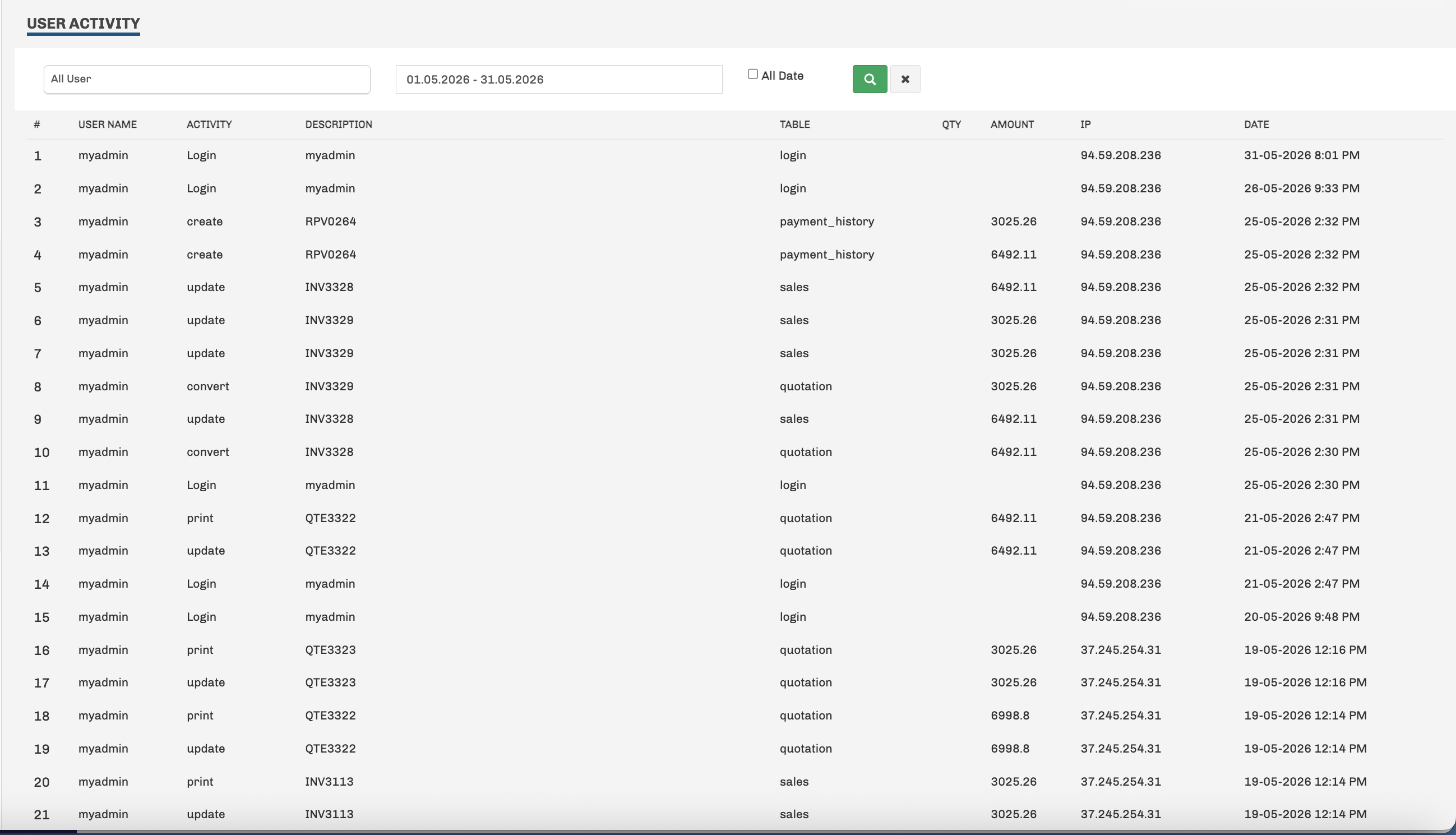
  • User-wise activity tracking
  • Login activity history
  • Create and update activity tracking
  • Print activity tracking
  • Document conversion tracking
  • Transaction / document reference history
  • Screen or module activity information
  • Transaction amount visibility
  • IP address tracking
  • Exact activity date and time
  • Filter activity by user and date range
HYRO Accounting - User Activity & Audit Trail
HYRO Accounting User Activity and Audit Trail
Powerful Business Reports

Complete Reports for Better Business Control

Review sales, purchases, receivables, payables, inventory, accounts, tax and financial performance from one reporting system.

💰

Sales Reports

  • Sales Details
  • Sales by Product Summary
  • Sales by Product
  • Sales Summary
  • Sales by Customer
  • Sales by Sales Person
  • Quotation by Product
  • Proforma Report
🛒

Purchase Reports

  • Purchase by Product
  • Purchase Details
  • Purchase by Vendor
📥

Receivable Reports

  • Customer Ledger
  • Customer Statement
  • Customer Aging
  • Balance Summary
  • Customer Outstanding
📤

Payable Reports

  • Vendor Ledger
  • Balance Summary
  • Vendor Outstanding
  • Vendor Aging
📦

Inventory Reports

  • Inventory Activity Report
  • Inventory Unit Report
  • Inventory Stock Location Report
📒

Accounts & Ledger

  • Expense Report
  • General Ledger
  • PDC Received
  • PDC Paid
🧾

Tax Reports

  • Tax Input Report
  • Tax Output Report
  • Tax Return
👤

User Activity Reports

  • User Login Activity
  • Create Activity
  • Update Activity
  • Print Activity
  • Document Conversion Activity
  • IP Address Tracking
  • Date & Time History
Better Financial Control

Keep Your Business Finances Under Control

HYRO Accounting brings sales, purchases, expenses, receivables, payables and financial information together so management can understand the business more clearly.

💰

Sales Control

Manage customer invoices, payments and outstanding balances from one system.

🛒

Purchase Control

Manage supplier purchases, payments and pending supplier balances more clearly.

📥

Receivable & Payable

Monitor customer receivables and supplier payables with detailed outstanding information.

📊

Financial Visibility

Review Profit & Loss, Trial Balance, Balance Sheet and other financial reports.

Why HYRO Accounting

Practical Accounting Software for Growing Businesses

HYRO Accounting is designed around practical day-to-day business requirements with powerful controls for management and finance teams.

01

Easy Daily Accounting

Manage sales, purchases, expenses, receipts and payments from one system.

02

Customer & Supplier Control

Maintain customer and supplier information with receivable and payable tracking.

03

Multi-User Permissions

Control View, Create, Edit, Delete and Print permissions for different user groups.

04

User Activity Tracking

Review important user actions with user, activity, IP address, date and time information.

05

Detailed Business Reports

Review sales, purchase, receivable, payable, inventory and accounting reports.

06

Financial Reporting

Understand business performance through Profit & Loss, Trial Balance and Balance Sheet.

Frequently Asked Questions

Questions About HYRO Accounting

Find answers to common questions about HYRO Accounting Software.

What can HYRO Accounting manage?

HYRO Accounting helps businesses manage customers, suppliers, sales, purchases, expenses, customer receipts, supplier payments, receivables, payables, inventory, tax information and financial reports.

Can I track customer outstanding balances?

Yes. HYRO Accounting provides customer ledger, customer statements, aging, balance summaries and outstanding reports.

Can I track supplier outstanding balances?

Yes. Supplier payments, vendor ledger, vendor outstanding and vendor aging information can be reviewed from the system.

Does HYRO Accounting support multiple users?

Yes. Multiple users can be created and permissions can be controlled by user group and module.

Can I control user permissions?

Yes. Permission control can be configured for View, Create, Edit, Delete and Print operations across supported modules.

Can management review user activity?

Yes. HYRO Accounting records important user activities such as login, create, update, print and document conversion together with date, time and IP information.

What financial reports are available?

HYRO Accounting includes financial reports such as Profit & Loss, Trial Balance and Balance Sheet, together with detailed operational reports.

Can I see HYRO Accounting before buying?

Yes. You can book a free HYRO Accounting software demonstration before making your decision.

Do you provide implementation and support?

HYRO Technologies provides software implementation, setup, training and ongoing support based on customer requirements.

Ready to See HYRO Accounting?

Book Your Free HYRO Accounting Demo

Tell us about your business and we will show you how HYRO Accounting can help manage sales, purchases, expenses, receivables, payables, reporting and financial control more efficiently.

✓ Free software demo ✓ No obligation ✓ UAE-based support